
Jewelry Design Software: Cost & Type Compared for 2026
- Written by Provence Team
- Updated on August 13, 2026
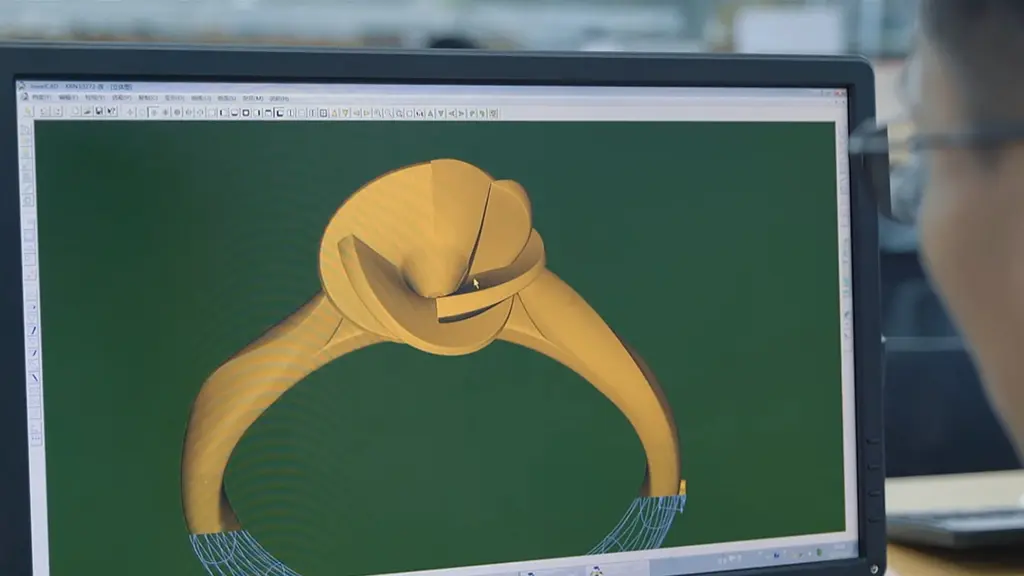
Table of Contents
Choosing jewelry design software is only half the decision. The other half — the one most buyer's guides skip — is what happens after you hit export. As an OEM/ODM manufacturer that turns CAD files into finished gold, lab-grown diamond, and moissanite jewelry every day, we see which files cast cleanly and which ones come back for rework. This guide breaks down every major type of jewelry design software available in 2026, what each is actually good for, and — critically — what a factory needs from your file to turn it into a real, sellable piece.
What is Jewelry Design Software
Jewelry design software is any digital tool used to model, render, or refine a piece of jewelry before it goes into production. Most rely on CAD (computer-aided design) technology to build precise three-dimensional models that can be exported as manufacturing files — the same files a factory uses to 3D print, CNC mill, or cast the piece in metal.
What most buyer's guides don't tell you is that the type of software you choose has downstream consequences. A file built in a sculpting tool like ZBrush needs retopology before it's production-ready. A parametric CAD file from Fusion 360 or RhinoGold arrives clean and dimensionally accurate. A browser-based concept tool might be perfect for pitching a client but useless for driving a CNC toolpath. Picking software isn't just about learning curve and price — it's about matching the tool to where your design needs to end up.
Quick Answer
- Jewelry design software falls into five categories: general-purpose 3D/CAD tools, jewelry-specific CAD systems, sculpting tools, browser/mobile/tablet apps, and AI-assisted design generators.
- Free tools (Blender, FreeCAD, Tinkercad) are workable for concepting and hobbyist work; commercial production at scale almost always runs on jewelry-specific CAD (RhinoGold, MatrixGold, 3Design, JewelCAD).
• The file format your software exports matters as much as the software itself — STL, OBJ, and STEP each carry different levels of manufacturing precision.
The 5 Categories of Jewelry Design Software
Rather than listing tools alphabetically, it's more useful to group them by what they're built to do. Here's how the market breaks down.
1. General-Purpose 3D and CAD Tools
These programs weren't built specifically for jewelry, but their modeling engines are powerful enough to handle it. Blender, Fusion 360, Rhino 3D, and FreeCAD fall into this group. They offer the most creative flexibility and, in Rhino's case, a huge plugin ecosystem — but jewelry-specific elements like gemstone libraries, prong generators, and ring sizing have to be built or added manually.
2. Jewelry-Specific CAD Systems
RhinoGold, MatrixGold, 3Design, and JewelCAD are purpose-built for the way jewelers actually work. They come with preloaded gemstone libraries (often 10,000+ cuts and sizes), parametric shank and setting components, automatic prong placement, and metal weight calculators. This is the software you'll find running production floors at commercial jewelry manufacturers, including ours.
3. Sculpting and Organic Modeling Tools
ZBrush and browser-based SculptGL let designers work the way a wax carver would — pushing, pulling, and smoothing a digital form as if it were clay. They're unmatched for organic, textured, or highly artistic pieces, but the resulting mesh usually needs retopology and cleanup before it's dimensionally reliable enough for casting.
4. Browser, Mobile, and Tablet Tools
Shapr3D (iPad-optimized), Tinkercad, Pencil, and Gravity Sketch (VR) represent the most accessible tier — no installation, gentle learning curves, and design-from-anywhere convenience. They're excellent for concepting, client presentations, and quick iteration, though they generally trade away some of the precision and advanced editing found in desktop-installed CAD.
5. AI-Assisted Design Generation Tools
A newer category: tools that generate design concepts, textures, or variations from a text prompt or rough sketch. These aren't replacements for CAD — they're ideation accelerators. A designer might use AI to generate ten variations on a halo setting in minutes, then take the strongest concept into a proper CAD program to build a production-ready file.
Full Comparison: 13 Jewelry Design Software Tools
This table adds two things most comparisons leave out: price tier and manufacturing file compatibility. If a tool can't export a format your manufacturer accepts, its feature list doesn't matter.
|
Software |
Category |
Price Tier |
Learning Curve |
Manufacturing File Export |
Best For |
|---|---|---|---|---|---|
|
Blender |
General 3D / Open-Source |
Free |
Steep |
STL, OBJ (via plugins) |
Sculptural, artistic designs on a zero budget |
|
Rhino / Rhino 3D |
General NURBS CAD |
Paid (one-time license) |
Moderate |
3DM, STEP, STL, OBJ, IGES |
Versatile modeling with a large plugin ecosystem |
|
RhinoGold / RhinoArtisan |
Jewelry-Specific CAD |
Paid (subscription/license) |
Moderate |
3DM, STL, OBJ, STEP |
Production studios needing an end-to-end jewelry workflow |
|
MatrixGold |
Jewelry-Specific CAD |
Paid (subscription/license) |
Moderate |
STL, OBJ, STEP |
Stone-setting-heavy commercial production |
|
JewelCAD |
Jewelry-Specific CAD |
Paid (license) |
Steep |
STL, OBJ |
High-volume Asian-market manufacturing workflows |
|
Gravity Sketch |
VR / Immersive |
Free tier / Paid tiers |
Moderate |
OBJ, STL |
Freehand 3D ideation in virtual space |
|
Pencil |
Browser / AI-Assisted |
Free tier / Paid tiers |
Gentle |
STL, OBJ (platform-dependent) |
Fast concept-to-catalog for small brands |
From CAD File to Finished Piece: What Actually Happens at a Factory
This is the step every other buyer's guide skips — and it's the step that determines whether your beautiful digital design becomes a beautiful physical one. When a file arrives at our production floor, it goes through a specific validation and manufacturing sequence before a single gram of gold is touched.
1. File Intake and Format Check
We accept STL, OBJ, STEP, and native 3DM files. STL is the most universal format for 3D printing but stores geometry as a mesh of flat triangles rather than true curves, which can introduce faceting on rounded surfaces if the export resolution is too low. STEP and 3DM preserve true curve geometry and are preferred for anything with complex, precise surfaces.
2. Wall Thickness and Castability Review
Every design is checked against minimum wall thickness for the metal being cast — typically 0.3–0.4mm minimum for gold, though thinner sections are prone to porosity or breakage during the lost-wax casting process. Designs built in general-purpose software without jewelry-specific validation tools are the most common source of thin-wall failures we catch at intake.
3. Stone Setting and Gemstone Library Accuracy
This is a gap none of the major buyer's guides address, and it's central to what we do. A prong or bezel setting is only as good as the gemstone dimensions it was built around. Jewelry-specific CAD software pulls from real, standardized gemstone libraries — accurate down to fractions of a millimeter for lab-grown diamonds, moissanite, cubic zirconia, and natural stones. Files built in general 3D software with manually estimated stone dimensions are far more likely to arrive with settings that are too loose, too tight, or misaligned once a real stone is set.
4. Manufacturing Route: 3D Printing, CNC, or Direct Casting
- 3D printing (resin or wax): the file drives a printer that produces a wax or resin pattern, which is then invested, burned out, and cast in molten metal via lost-wax casting.
- CNC milling: the file drives a computer-controlled cutting tool that carves the piece directly from a metal or wax blank — used for pieces requiring extremely tight tolerances.
- Direct-to-production: for repeat or high-volume designs, a validated file moves straight into a repeatable casting workflow without a new prototype each time.
5. Quality Control Before Finishing
Cast pieces are checked against the original CAD dimensions before polishing, plating, or stone setting proceeds — catching any shrinkage or distortion introduced during casting while it's still cheap to correct.
Why This Matters for Your Software Choice
- If you're designing for eventual manufacturing (not just visualization), prioritize software that exports STEP or 3DM, not just STL.
- Jewelry-specific CAD (RhinoGold, MatrixGold, 3Design, JewelCAD) builds in castability and stone-fit logic that general 3D tools leave entirely up to the designer.
• A manufacturer can often rescue a rough file, but every round of correction adds time to your production timeline — starting with the right software saves weeks later.
Free vs. Paid: What You Actually Lose in the Free Tier
Free software has genuinely improved — Blender and FreeCAD can produce commercially viable results in the right hands. But there are specific, practical trade-offs worth knowing before you commit weeks to learning one.
- Export limitations: some free tiers cap or restrict export formats, so you may design something you can't hand off in the format a manufacturer needs.
- No built-in gemstone libraries: general free tools require manually modeling every stone and prong from scratch, with real risk of dimensional error.
- No production integration: free tools rarely connect to manufacturing partners directly, so there's an extra manual step between finished design and finished product.
- Support and learning resources: paid software typically includes structured tutorials and dedicated support; free tools rely on community forums.
None of this means free tools aren't worth using — for concepting, learning, and portfolio-building, they're excellent. The trade-offs matter most once you're moving a specific design into real production.
Choosing Software by Your Goal
Hobbyist or Student
Start with Tinkercad or Blender. Both are free, well-documented, and let you learn 3D thinking before investing in specialized tools.
Independent Designer Building a Portfolio
Fusion 360 or Shapr3D offer the best balance of precision and approachable pricing, with export options that keep manufacturing doors open as your designs mature.
Professional Studio or High-Volume Workshop
Jewelry-specific CAD — RhinoGold, MatrixGold, 3Design, or JewelCAD — pays for itself through faster iteration, accurate stone libraries, and production-ready output.
Brand Outsourcing to a Manufacturer
If you're a jewelry brand rather than a hands-on designer, the software matters less than your manufacturing partner's tolerances and QC process. A perfectly modeled file still depends on the factory behind it to become a well-made piece. This is where an experienced OEM partner earns its keep.
From CAD File to Finished Collection: How Provence Jewellery Can Help
Whatever software you design in, Provence Jewellery can take your file from concept to finished piece. As an OEM/ODM manufacturer working in solid gold, lab-grown diamonds, moissanite, and natural gemstones, we work daily with files from every category covered in this guide — reviewing wall thickness, validating stone fit, and managing the route from CAD to casting to finished, hallmark-ready jewelry.
For Independent Designers and Retail Customers
- Bring your own CAD file, or work with our team to refine a concept into a production-ready design.
• We support STL, OBJ, STEP, and 3DM files across all major jewelry CAD platforms.
For Brands and B2B Partners
- Full OEM/ODM production across gold, lab-grown diamonds, moissanite, and natural gemstones.
- File review, castability checks, and compliance-ready manufacturing for the US, UK, and EU markets.
• Contact our team to discuss a design file, a collection, or a private-label production run.
Frequently Asked Questions
Most professional workshops and manufacturers use jewelry-specific CAD systems — RhinoGold, MatrixGold, 3Design, or JewelCAD — because they include gemstone libraries, parametric settings, and production-ready export built specifically for jewelry.
Yes. Blender, FreeCAD, and Tinkercad are completely free and capable of producing designs suitable for manufacturing, though they lack the jewelry-specific libraries and tools built into paid, specialized software.
STL is the most universal format for 3D printing, but STEP and 3DM preserve true curve geometry and are preferable for complex or highly precise designs. Confirm accepted formats with your manufacturer before finalizing a file.
No. Many manufacturers, including Provence Jewellery, work with designers and brands at every skill level — from a finished CAD file to a rough sketch or reference image that our team can develop into a production-ready design.
STL and OBJ store geometry as a mesh of flat triangular facets, which is fine for most 3D printing but can lose precision on complex curves at low resolution. STEP files store true mathematical curve data, preserving exact geometry — often preferred for high-precision or CNC-bound designs.
 English